CSS INTRODUCTION
- development
- css
Using CSS
CSS can be added in different ways.
Slope Style
- Inline style attribute
<h1 style="color: #98c7d4;">CSS Cross Country</h1>
- In the
<head>
<head>
  <style>
    h1 {
      color: #98c7d4;
    }
  </style>
</head>
- External
<head>
<head>
  <title>CSS Cross Country</title>
  <link rel="stylesheet" href="styles.css" />
</head>
Selectors
Primary DOM selectors:
Element selector
HTML
<h1 class="intro" id="header">Nice and Toasty</h1>
CSS
h1 {
  color: #aba4ac;
  margin-bottom: 10px;
}
Class selector
HTML
<h1 class="intro" id="header">Nice and Toasty</h1>
CSS
.intro {
  color: #aba4ac;
  margin-bottom: 10px;
}
ID selector
HTML
<h1 class="intro" id="header">Nice and Toasty</h1>
CSS
#header {
  color: #aba4ac;
  margin-bottom: 10px;
}
Compound selectors
HTML
<h1 class="intro" id="header">Nice and Toasty</h1>
CSS
h1#header {
  color: #aba4ac;
  margin-bottom: 10px;
}
Cascade Order
Style priority is determined by position in site:
- External
<link> - In the
<head> - Inline style attribute
- Using !important
Above order represents Increasing Priority.
Priority is also dependent on position in document:
.intro {
  color: #444245;
}
.intro {
  color: #dddadd;
}
the second color definition for .intro overrides the first.
Non-conflicting properties will be combined:
.intro {
  color: #dddadd;
}
.intro {
  margin-bottom: 5px;
  width: 900px;
}
This can ve combined into:
.intro {
  color: #dddadd;
  margin-bottom: 5px;
  width: 900px;
}
Floating Left & Right
Let's look at how float works. Look at the following markup:
<article>
  <img src="ski.jpg" alt="Ski!" />
  To successfully ski, simply do not fall.
</article>
img {
  float: left;
}
So, floating removes elements from the document flow and moves them to a specified edge. The other content within the parent element will wrap around floats.

float: left / right / none
Stacking order
Floated elements stack up to the parent edge, then move down to the next available edge.
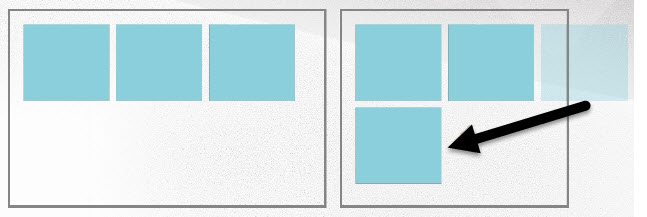
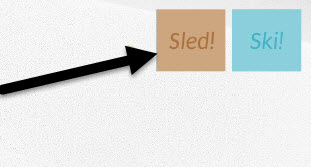
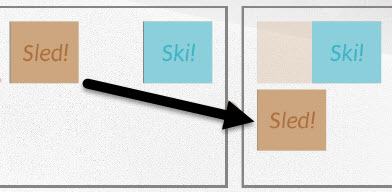
Take care with elements that have differing heights - the first available edge isn't always below.
<article>
  <img class="ski" src="ski.jpg" alt="Ski!" />
  <img class="sled" src="sled.jpg" alt="Sled!" />
</article>
.ski {
  float: right;
}
.sled {
  float: left;
}
.ski {
  float: right;
}
.sled {
  float: right;
}